
Have you ever discovered a spelling error in an index or transcription? Perhaps you have then looked at the original document (always a good idea!), only to discover that the name or word is spelled slightly (or completely) different? This is not uncommon and happens in both typed and handwritten documents. Thankfully, there are some common tricks and strategies to overcome these confusing and difficult realities.
As is often said, spelling does not matter in genealogy, except it kind of does. If you do not know how something is spelled, you can use wildcards (i.e., *, $/%, or ?), but that is not always guaranteed to work. There are other tools, like Soundex, that could be helpful as well. In addition, you will want to keep a record of all the misspellings you find. For example, you may find that an ancestor’s last name was spelled Smith, Smyth, Smithe, Smythe, etc. Keeping a record of all of these and where/when you found them can be helpful for finding additional documents and records.
In addition to these tricks and strategies, FamilySearch has an entire page that gives you suggestions for how to search transcriptions by identifying common errors. Check out their Spelling Substitution Tables for the full list of examples. In addition to spelling suggestions, they also include some phonetic search tips. Both of these strategies help you misspell for success!
A Short History of Transcription
As many know, in earlier days, folks had to transcribe documents by hand and create indexes by combing through thousands of pages. This was extremely laborious and took a long time to accomplish. And while it was a great way to make information searchable, errors still crept into the process. When handwriting was difficult to read or a scan/document was faint or fuzzy, the transcriber had to try their best.
During the last couple of decades, optical character recognition (OCR) has really changed how transcription happens. Various programs and tools have made it so much easier to transform a scan or photo with typed text into a searchable resource. You have likely taken advantage of OCR, even if you did not know it. When you have searched a scanned typed document in a database and found useful names/words, you have likely benefited from this technological advance; however, it was limited to typed text for the most part. Recently, advances in artificial intelligence (AI) have made handwritten transcription possible as well.
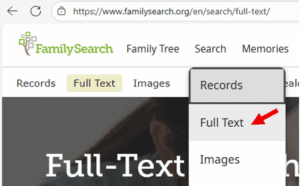 Nowadays, advanced computers and AI programs convert handwriting (including cursive!) into searchable text. Sites like FamilySearch have launched a Full-Text Search feature. Originally, this only included land and probate records but now includes a lot of other types of handwritten documents. These newly searchable documents can really help expand your knowledge of ancestors and their FAN Club (i.e., friends, associates, and neighbors)! Previously, you had to rely on an index or scour each page for information.
FamilySearch is not the first to utilize AI to transcribe handwritten documents. When the 1950 U.S. Census was released a few years ago, artificial intelligence made quick work of transcribing the thousands of handwritten pages. Within a short time, the extremely valuable information from the census was made available to genealogical researchers. Previously, humans volunteered to help transcribe these documents page by page. Like indexing, this took an extremely long time.
Are you interested in transcribing using AI? Try out Transkribus. It is an AI-powered site that specializes in handwritten text, and it includes some free tools. Genealogists and other researchers are actively training it to recognize a variety of texts, including many from other countries and centuries. Watch this brief tutorial to learn how to use it. Alternatively, if you are interested in manually transcribing and/or proofing transcription/indexes, there is still a place for you! Check out opportunities at FamilySearch and the Library of Congress.
Have fun misspelling and benefiting from your errors (err efforts)!
Discover more from Cook Memorial Public Library District
Subscribe to get the latest posts sent to your email.
Categories: Genealogy
Tags: Genealogy